Vulnerabilities
Understanding PHP2Shell: PHP internals, sessions, and memory management
Part 1 of our PHP2Shell investigation into CVE-2026-109618 and CVE-2026-109619 - how PHP handles a request, where sessions and memory come in, and the lifecycle details Parts 2 and 3 build on. It starts from the basics and needs no prior experience with memory corruption.
16 min read
Key takeaways
- PHP2Shell is two real PHP core flaws, CVE-2026-109618 and CVE-2026-109619, fixed on 21 October 2026 in PHP 8.4.27 and the parallel 8.2, 8.3 and 8.5 releases.
- The session upload-progress callback can initialise the session id during request parsing, before the flag that gates extension cleanup is set.
- A hash-table insertion counts a slot before it fills it; if a fatal error jumps out in between, teardown can still read the unfilled slot.
- An ordinary out-of-memory error is not the bug. We reproduced OOM on every build but observed allocator corruption only on the unpatched 8.4.26.
- This part is background and a local lab only. We did not demonstrate code execution through memory corruption, and our evidence for the original corruption site is partial.
On this page7 sections
1. Why we started looking into this
Correction, 18 November 2026
An earlier version of this article said PHP 8.4.26 showed allocator corruption in 10 of 20 trials. That figure came from a counting error in our own validator. The raw server log shows the worker aborting in all 20 trials. The text and the results table below are corrected, and Part 3 explains what went wrong.
After reading Calif's PHP2Shell research, we started investigating CVE-2026-109618 and CVE-2026-109619 in PHP itself.
The vulnerabilities involve how PHP handles out-of-memory (OOM) conditions and partially initialized internal state. Under certain conditions, an operation can be interrupted before PHP finishes updating or cleaning up its internal data structures.
We did not want to stop at running a proof of concept. We wanted to trace what PHP was doing and why the behavior changed between releases.
We set up a vulnerable build, tried to reproduce the issue, and compared it with patched releases while reading the relevant source.
The first attempts did not go smoothly.
Some tests failed because of incorrect configuration. Others successfully triggered OOM without producing memory corruption. And for a while our own tooling told us that only half of 20 trials had corrupted the heap, when the raw server log showed that all 20 had. The counter was reading a sliding window of the log.
We ended up investigating three separate behaviors. Two came from application-level session handling and still worked on patched PHP. The third involved PHP's own memory handling.
We split the write-up into three parts:
- Part 1 (this part) builds the PHP concepts needed to understand the issue and a small laboratory for studying request and memory behavior.
- Part 2 examines the PHP source code and compares the vulnerable and patched releases.
- Part 3 presents the reproduction, the measured results, all three categories, and the limitations of our findings.
The lab exercises focus on demonstrations against an isolated local environment. Everything behind the series is in our PHP2SHELL repository on GitHub:
poc/- the harness used for the experiments: the command-execution chains for the two session-handling behaviors (Categories A and B) and the corruption trigger for the memory one (Category C).lab/- the Docker lab the harness runs against, including the vulnerable PHP 8.4.26 environment.evidence/- the raw server logs from the five-build corruption test.
Read the repository's security notes before running anything, and run the harness only against that lab, on a machine you control.
We separate what we found in the source from what we observed in the lab. Reading code can suggest a cause, but it does not prove that the same path caused a particular crash.
Results at a glance
The measurements and debugging work behind these results are covered in Part 3.
| Research question | Finding |
|---|---|
| Can ordinary OOM be reproduced? | Yes, on all five tested builds |
| Was allocator corruption observed? | Yes, in 20/20 trials on PHP 8.4.26 |
| Was corruption observed on patched comparisons? | No, 0/20 on each of the four |
| Was the original corruption site identified? | No |
| Was RCE demonstrated through memory corruption? | No |
| Did application-level chains work on patched PHP? | Yes, in the synthetic lab |
The data behind the OOM and corruption rows is in the repository. evidence/ holds the raw server logs, and recount.py recounts every trial from them without needing the lab. The validator's original report, c_validation.json, under-counted the 8.4.26 run as 10/20. The repository's errata explain how.
Read 20/20 as what our lab observed with one sequence of requests in one configuration, not as a probability of exploitation, and 0/20 as no corruption seen, not as proof that none can occur.
2. PHP request lifecycle and sessions
2.1 The pipeline
When someone visits a PHP application running on Apache, the process generally looks like this:
- Browser
- HTTP requestApache
- PHP request initialization
- Parse GET / POST / FILES
- Initialize extensions
- Execute PHP application
- Request shutdown
- HTTP response
This is simplified. The exact lifecycle depends on the SAPI and configuration.
Two details matter here.
First, PHP performs considerable work before executing the application's script. It may parse request bodies, process uploaded files, initialize internal data structures, and invoke extension callbacks.
Second, a server process can handle multiple requests over its lifetime.
That means the engine must correctly initialize and clean up request-specific resources. Otherwise, problems can appear during later processing.
2.2 What a PHP worker is
With Apache's prefork model and mod_php, a worker process handles one request, finishes it, and may later handle another.
Worker process
- Request 1
- Initialization
- Execution
- Cleanup
- Request 2
- Initialization
- Execution
- Cleanup
Each request has its own lifecycle even though the process survives.
2.3 When PHP skips extension cleanup
PHP only cleans up after its extensions at the end of a request if their startup finished. That one check matters for everything that follows.
During startup, PHP parses the request body (POST data and uploaded files), starts each extension, and then sets a flag to record that it got that far:
c
/* main/main.c, php_request_startup() - excerpt */
php_hash_environment();      /* parse POST data and uploads   */
zend_activate_modules();     /* start every extension (RINIT) */
PG(modules_activated) = 1;
At the end of the request, PHP checks that flag before asking extensions to clean up:
c
/* main/main.c, php_request_shutdown() - excerpt */
if (PG(modules_activated)) {
    zend_deactivate_modules();
}
If a fatal error, such as running out of memory, stops PHP while it is still parsing the request, PG(modules_activated) stays at 0. Request shutdown still runs, but it skips the extension cleanup.
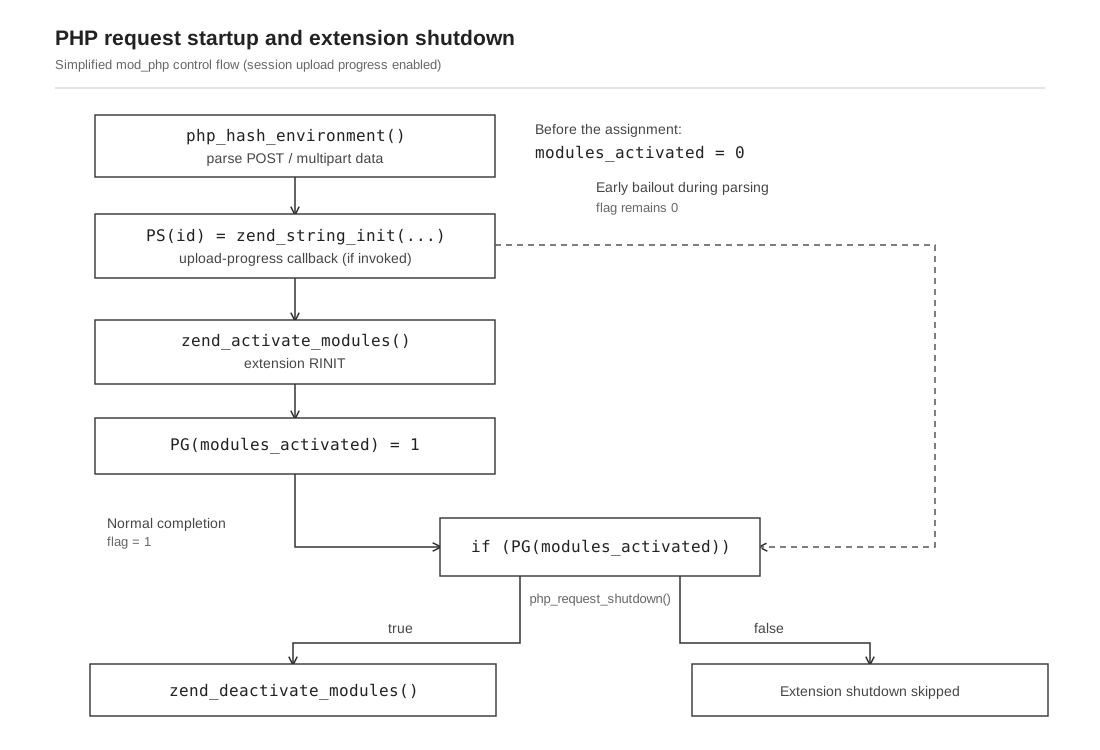
Figure 1. Request parsing can initialize PS(id) before modules_activated is set. If parsing bails out at that point, the normal extension shutdown call is skipped.
We also watched this happen in a debugger. In our trace of PHP 8.4.26 built with debug symbols, an out-of-memory error during multipart parsing reached php_request_shutdown() with PG(modules_activated) still 0 and PS(id) still set, so the extension cleanup was skipped.
That establishes the shutdown path, not the cause of the crash.
It tells us the control flow has a branch that skips extension cleanup. It does not, by itself, establish that any particular pointer became dangling, that the worker always survived, or that skipped cleanup caused the corruption we later observed. Those are separate questions, and Part 3 shows that our evidence for them is partial.
The concern is that PHP may discard the request heap without first running the extension cleanup normally associated with that state.
2.4 Sessions
PHP sessions allow applications to maintain information across requests.
php
<?php
session_start();

$_SESSION['username'] = 'alice';
$_SESSION['authenticated'] = true;

echo "Session initialized";
PHP associates the session with an identifier, usually carried in a cookie such as PHPSESSID. A later request can read the data back:
php
<?php
session_start();

echo $_SESSION['username'] ?? 'Guest';
Depending on the configured handler, session data may live in files, a database, Redis, or another backend.
The session identifier and the stored session data are separate. That distinction matters in Part 3.
2.5 Session upload progress
PHP can track multipart upload progress through session data, via session.upload_progress.
- HTTP multipart request
- PHP multipart parser
- Upload progress callback
- Session progress update
- Continue processing upload
The upload-progress callback can touch session state during request parsing, before the application script runs.
2.6 Session state initialized during parsing
Here is the code path that does it:
c
/* ext/session/session.c, MULTIPART_EVENT_FILE_START - excerpt */
if (Z_ISUNDEF(progress->data)) {
    ...
    php_rinit_session(0);
    PS(id) = zend_string_init(Z_STRVAL(progress->sid), Z_STRLEN(progress->sid), 0);
    ...
}
Two observations from this excerpt:
PS(id)is a string allocated during request processing, on the request heap.- This runs during
php_hash_environment(), beforezend_activate_modules(), so the flag in section 2.3 is still 0.
The cleanup that would normally release that string lives in php_rshutdown_session_globals(), an extension shutdown handler, the same path gated by the conditional above.
This gives us an early session initialization path and a condition under which extension shutdown is skipped. We did not establish that this sequence caused the allocator corruption. Part 2 covers the source changes; Part 3 covers what we could reproduce.
3. A beginner Docker lab: sessions, memory, and OOM
Before looking at engine internals, it helps to build a small lab and watch ordinary behavior: sessions persisting, memory being used, and a normal OOM error.
This is a teaching lab, separate from the research lab in the repository's lab/ folder, which Part 3 walks through.
You need Docker and a terminal.
php-memory-lab/
- Dockerfile
- php.ini
- compose.yaml
- index.php
- memory.php
- oom.php
- session_info.php
3.1 Dockerfile
dockerfile
FROM php:8.4-apache

COPY php.ini /usr/local/etc/php/conf.d/lab.ini
COPY ./*.php /var/www/html/
Two notes on reproducibility.
The image tag php:8.4-apache floats: it currently resolves to a patched 8.4 release, and will move again. If you need a stable environment, something like php:8.4.27-apache is better than the floating tag, but a tag is still not a digest. To pin exactly:
bash
docker image inspect php:8.4.27-apache --format '{{index .RepoDigests 0}}'and use the resulting name@sha256:... reference.
Also note that the Dockerfile copies every PHP file in the directory. If you add oom.php later (exercise 2), it will be present, provided you rebuild. Without rebuilding, the new file will not be copied into the image.
3.2 php.ini
ini
memory_limit = 16M
display_errors = On
log_errors = On
session.upload_progress.enabled = On
The low memory limit is for observing ordinary OOM handling. It is not intended to reproduce the vulnerability.
3.3 index.php
php
<?php

session_start();

$_SESSION['visits'] =
    ($_SESSION['visits'] ?? 0) + 1;

echo "<h2>PHP Memory Lab</h2>";

echo "PHP Version: " . PHP_VERSION . "<br>";
echo "Session active: " .
    (session_status() === PHP_SESSION_ACTIVE ? "yes" : "no") . "<br>";
echo "Visits: " . $_SESSION['visits'] . "<br>";

echo "Memory Limit: " .
    ini_get('memory_limit') . "<br>";

echo "Memory Usage: " .
    memory_get_usage(true) . "<br>";
The page deliberately does not print the session identifier. If you need it for local debugging, print it temporarily and never on a page reachable by others.
3.4 compose.yaml
yaml
services:
  php:
    build: .
    ports:
      - "127.0.0.1:8080:80"
bash
docker compose up --build -dOpen http://127.0.0.1:8080 and refresh a few times. The visit counter should increase, showing session data persisting across requests.
3.5 Exercise 1: watch memory usage
Save this as memory.php and open it in the lab:
php
<?php
$data = [];
for ($i = 0; $i < 1000; $i++) {
    $data[] = str_repeat("A", 1024);
}
echo "Memory usage: " . memory_get_usage(true);
Compare a few sizes. The point is to build intuition for how allocation shows up in the number, not to reach the limit.
3.6 Exercise 2: an ordinary OOM
php
<?php
ini_set('memory_limit', '8M');
$data = str_repeat('A', 16 * 1024 * 1024);
echo strlen($data);
Rebuild, then open oom.php. You should see a fatal error about the allowed memory size.
This demonstrates ordinary memory-limit enforcement. It does not demonstrate heap corruption, a session vulnerability, or code execution.
An OOM error alone does not reproduce either CVE.
3.7 Exercise 3: find where sessions actually live
Do not assume the session directory. Save this as session_info.php and ask PHP:
php
<?php
header('Content-Type: text/plain');

echo "save_handler: " . ini_get('session.save_handler') . "\n";
echo "serialize_handler: " . ini_get('session.serialize_handler') . "\n";
echo "save_path: " . ini_get('session.save_path') . "\n";
Then, inside the container:
bash
docker compose exec php php -r 'echo session_save_path(), PHP_EOL;'Several practical warnings:
save_pathcan be empty, in which case PHP falls back to a default that is not necessarily visible from that one call. Check the effective value withdocker compose exec php php -i | grep session.save_path, and treat the compiled-in fallback as something to look up rather than guess.- It can also use the
N;/pathorN;MODE;/pathsyntax, where the leading number is a directory level and a hash of the session ID chooses the subdirectory. Treat the configured value as a format, not a path. - Session data may only be written when the request finishes, so inspecting the directory during a request can show nothing.
- Only the
fileshandler uses files. With Redis or another handler there is nothing to list.
A safer way to identify the right file is by modification time rather than by printing the session identifier:
bash
P=$(docker compose exec -T php php -r 'echo session_save_path();')

if [ -n "$P" ]; then
    docker compose exec -T php ls -lat "$P"
else
    echo "Session path is empty; check the effective configuration."
fi
You are looking for a small file that changed when you refreshed the page. Its contents will look like:
visits|i:3;That line is the whole session. In Part 3 we will see why "the session is just bytes in a file" matters.
4. C fundamentals: pointers, structs, and hash tables
PHP is written primarily in C, so a little C helps when reading the source.
4.1 Pointers
c
int age = 25;
int *p = &age;
age holds 25, &age is its address, p stores that address, and *p reads through it.
A pointer does not own what it points at. It holds an address, and nothing more.
4.2 Allocation and free
c
#include <stdlib.h>

int *p = malloc(sizeof(int));

if (p == NULL) {
    return 1;
}

*p = 25;
free(p);
The allocation can fail, so the program checks. After free(p) the allocation is gone even though p still holds the old address. Reading through it is a use-after-free.
4.3 Inconsistent state
Suppose a structure tracks ten objects:
objects = 10but only nine were fully initialized. Code that trusts the counter will read the tenth anyway.
This is the type of inconsistent state we looked for: bookkeeping updated before the underlying data is fully initialized.
4.4 Hash tables
PHP arrays are hash tables. This:
php
<?php
$user = ['name' => 'Alice', 'age' => 25];
becomes buckets holding keys and values, plus bookkeeping fields on the table itself. One of those fields is nNumUsed, which counts used bucket slots.
A simplified view of an insertion:
1. index = table->nNumUsed++;
2. bucket = table->arData + index;
3. bucket->key = ...;
4. bucket->value = ...;
The counter advances before the bucket is filled. That ordering is not automatically a bug, it depends on what can happen between steps 1 and 4. If step 3 can fail by returning normally, the caller can deal with it. If step 3 can jump out of the function instead, the table is left with a counted-but-unfilled slot.
4.5 What the source actually looks like
Here is an excerpt from PHP 8.4.26 (abbreviated with ... for the parts not relevant here):
c
/* Zend/zend_hash.c - excerpt, abbreviated */
add_to_hash:
    idx = ht->nNumUsed++;                            /* count first */
    ht->nNumOfElements++;
    p = ht->arData + idx;
    p->key = key = zend_string_init(str, len, ...);  /* can fail */
    ...
    p->h = ZSTR_H(key) = h;
    ZVAL_COPY_VALUE(&p->val, pData);
And an excerpt from table destruction:
c
/* Zend/zend_hash.c, zend_array_destroy() - excerpt */
for (p = ht->arData; p != ht->arData + ht->nNumUsed; p++) {
    i_zval_ptr_dtor(&p->val);
    if (p->key) { zend_string_release(p->key); }
}
Teardown iterates up to nNumUsed. If an insertion had been interrupted between the counter increment and the bucket fill, that loop would be one bucket longer than the initialized data, and would read a slot that was never written.
This is a possible consequence of the insertion order, not a confirmed explanation for our crash. We could not identify the original corruption site.
4.6 Exercise: read the struct
Open Zend/zend_hash.h and find Bucket. Then answer:
- which fields does the insert excerpt write?
- which of them does the destruction loop read?
- what is
arData, and what doesarData + idxpoint at?
Compare the fields written during insertion with those read during destruction.
5. Understanding PHP's OOM handling
5.1 What memory_limit actually limits
ini
memory_limit = 16MThis does not mean the machine has 16 MB. It means PHP's memory manager accounts for request allocations against a 16 MB budget.
Exceeding it produces:
Fatal error: Allowed memory size of 16777216 bytes exhaustedThat message is ordinary and expected for a runaway allocation.
5.2 The three-step problem
Now suppose the engine is in the middle of an internal operation:
1. publish state      (count the slot)
2. fallible work      (allocate memory for it)
3. finish             (fill the slot)
If step 2 fails by returning an error, the caller can undo step 1 or simply abort safely.
If step 2 fails by jumping out, steps 1 and 3 disagree: the count says the slot exists, the memory says it does not.
5.3 zend_bailout
PHP uses zend_bailout() for nonlocal control flow on fatal conditions. It is not a return; it unwinds to an outer recovery point, skipping the rest of the interrupted function.
- Start operation
- Publish state
- Allocate
- Bailoutjumps to Recovery point
- Finish (never runs)
That is why the ordering in section 4.5 matters if the allocation can bail out.
5.4 Advanced: how the allocator decides
Beginners can skip this subsection. It matters for understanding why two PHP versions behave differently, and it is where precision is easy to lose.
PHP's allocator tracks more than one number:
| Term | Meaning |
|---|---|
| Soft limit | memory_limit as configured. The ordinary budget. |
| Hard limit | A derived ceiling above the soft limit. With memory_hard_limit_percent unset (the default), it is 200% of memory_limit when the limit is at most 1G, and memory_limit + 1G when it is above 1G; the percentage can also be set explicitly. Crossing it is fatal. |
| Fallible mode | A per-allocation flag. A fallible allocation reports failure to its caller instead of raising. |
These are separate mechanisms. A soft limit does not make memory_limit optional. It means that on some allocator paths the limit is enforced by recording an error and continuing, rather than by raising immediately.
The branch looks roughly like this (excerpt; verify against your revision):
c
/* Zend/zend_alloc.c, zend_mm_check_limit() - excerpt */
if (!heap->fallible && add_size > heap->hard_limit - heap->real_size) {
    zend_mm_hard_limit_error(...);                    /* noreturn */
}
if (!ZEND_HAS_OOM()) { zend_mm_delayed_error(...); }
return heap->fallible ? FAILURE : SUCCESS;
There are some limits to this description:
- Delayed handling applies to particular allocator paths, not to every PHP allocation. Some paths, and the hard limit, still terminate.
return SUCCESShere means "the allocation may proceed while an error is pending", not "the error is ignored".- Which path you hit depends on the allocation site and the build. This is version-specific behaviour, and the excerpt above should be checked against the exact source revision you are studying.
In 8.4.26 this branch does not exist: crossing the soft limit raises immediately. (The hard-limit computation above was checked against zend_mm_update_hard_limit() in the 8.4.27 source: percent == -1 resolves to 200, except that limits above 1G add a fixed 1G buffer.) That difference is part of why the same request can behave differently on the two builds, which is the subject of Part 2.
Our allocator trace notes follow this branch through the 8.4.27 source, including where the pending error is set, handled and reset.
What Part 2 builds on
The source comparison in Part 2 builds on three details:
- a lifecycle inconsistency: a request can end with its heap discarded but without the extension cleanup that normally runs first (section 2.3);
- a counted-but-unfilled slot: a hash insertion increments
nNumUsedbefore the bucket is filled, and teardown trusts the counter (section 4.5); - a nonlocal jump:
zend_bailout()can leave an interrupted function without finishing it (section 5.3), and whether an allocation can trigger it differs between 8.4.26 and 8.4.27 (section 5.4).
In Part 2, we compare PHP 8.4.26 with 8.4.27 and examine how the changes affect these paths. The lab results and GDB analysis follow in Part 3.
References
- PHP security advisory, 21 October 2026 - the official announcement of the fixes, which distinguishes the two CVEs and names the patched releases.
- PHP sessions - the session handling book in the PHP manual.
- Session upload progress - how PHP tracks multipart upload progress through the session.
- PHP security releases and source - the project home, where patched releases and source are published.
- Original PHP2Shell research by Calif - the research this investigation follows.
- PHP2SHELL repository - our lab, test harness, validator report and raw logs for this series.
The lab and harness are published on GitHub for reproducibility and defensive study. Run them only against the isolated environment in lab/.
Keep reading
- PHP2Shell Part 2: Source Analysis and PatchesWhat changed in the PHP source between 8.4.26 and 8.4.27, file by file, and what a diff cannot tell you.
- PHP2Shell Part 3: Reproduction and ResultsThe experiment across five builds, the crash in a debugger, and the counting error we had to correct.
- Session management and logoutSessions from the defender's side, and what sound session handling looks like in an application.