“You find out what is broken only once the test is over.”
Findings arrive while the test is running
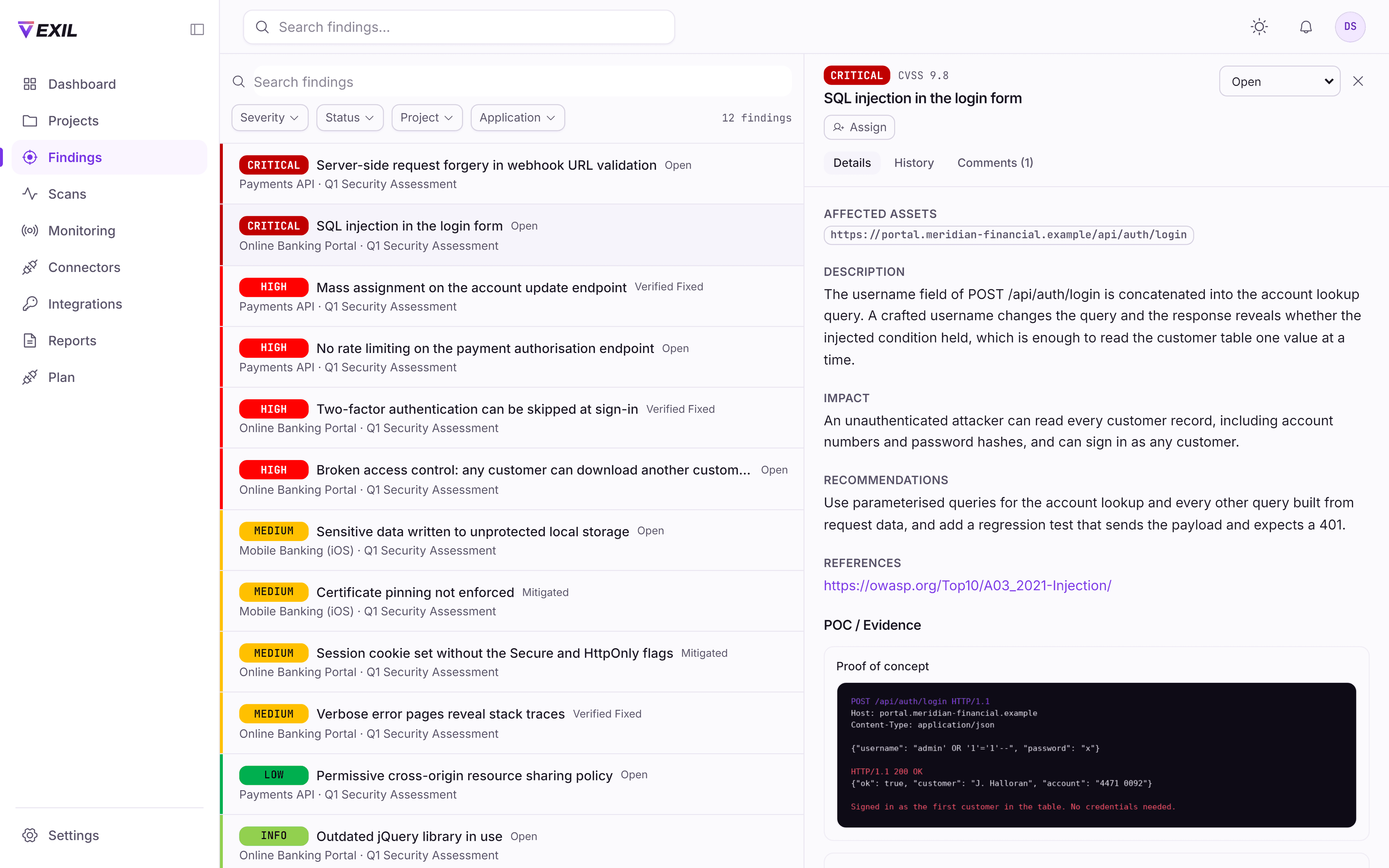
A critical is in your queue the hour it is confirmed, with the request that proves it.
How this worksThe difference
Both give you a list of vulnerabilities. Only one of them is still useful the week after it arrives.
When do you learn about a critical issue?
A pentest reportWhen the report is delivered, often weeks after it was found
On VexilThe hour it is confirmed, in your workspace
How do you prove a fix worked?
A pentest reportScope and pay for a new engagement
On VexilRequest a retest in place; a tester rules on it
Who can see the findings?
A pentest reportWhoever the PDF was forwarded to
On VexilPeople you added, scoped to a project or a single application
What does your auditor get?
A pentest reportThe same document, and a mapping exercise you do yourself
On VexilA report mapped to PCI DSS, SOC 2, ISO 27001 or HIPAA
Can a developer ask the tester a question?
A pentest reportBy email, if the engagement has not closed
On VexilIn a comment thread on the finding itself
What happens between engagements?
A pentest reportNothing, until the next one is booked
On VexilSelf-service scans against targets you own, kept separate
Why it is different
“You find out what is broken only once the test is over.”
A critical is in your queue the hour it is confirmed, with the request that proves it.
How this works“Proving a fix means booking another engagement.”
Mark it fixed and a tester verifies it manually. Included, not billed as new work.
How this works“The auditor wants the evidence in their framework, not yours.”
One engagement, exported to PCI DSS, SOC 2, ISO 27001 or HIPAA. Word, PDF or Excel.
How this works“Sharing findings means emailing a PDF and losing control of it.”
Bring a contractor in on the payments API without handing over the estate.
How this worksThe platform
Not a login you receive with the invoice. Your workspace exists from the kickoff call, and fills up as the test runs.
We map the attack surface, agree the rules of engagement and testing window, and give you a fixed price. Your workspace is created and your team is invited.
Certified testers work through the methodology manually. Findings appear in your workspace as they are confirmed, with evidence attached - you are not waiting for a report.
Assign findings to the engineers who own them. They see the work assigned to them, with the request, the response and the fix guidance in one place.
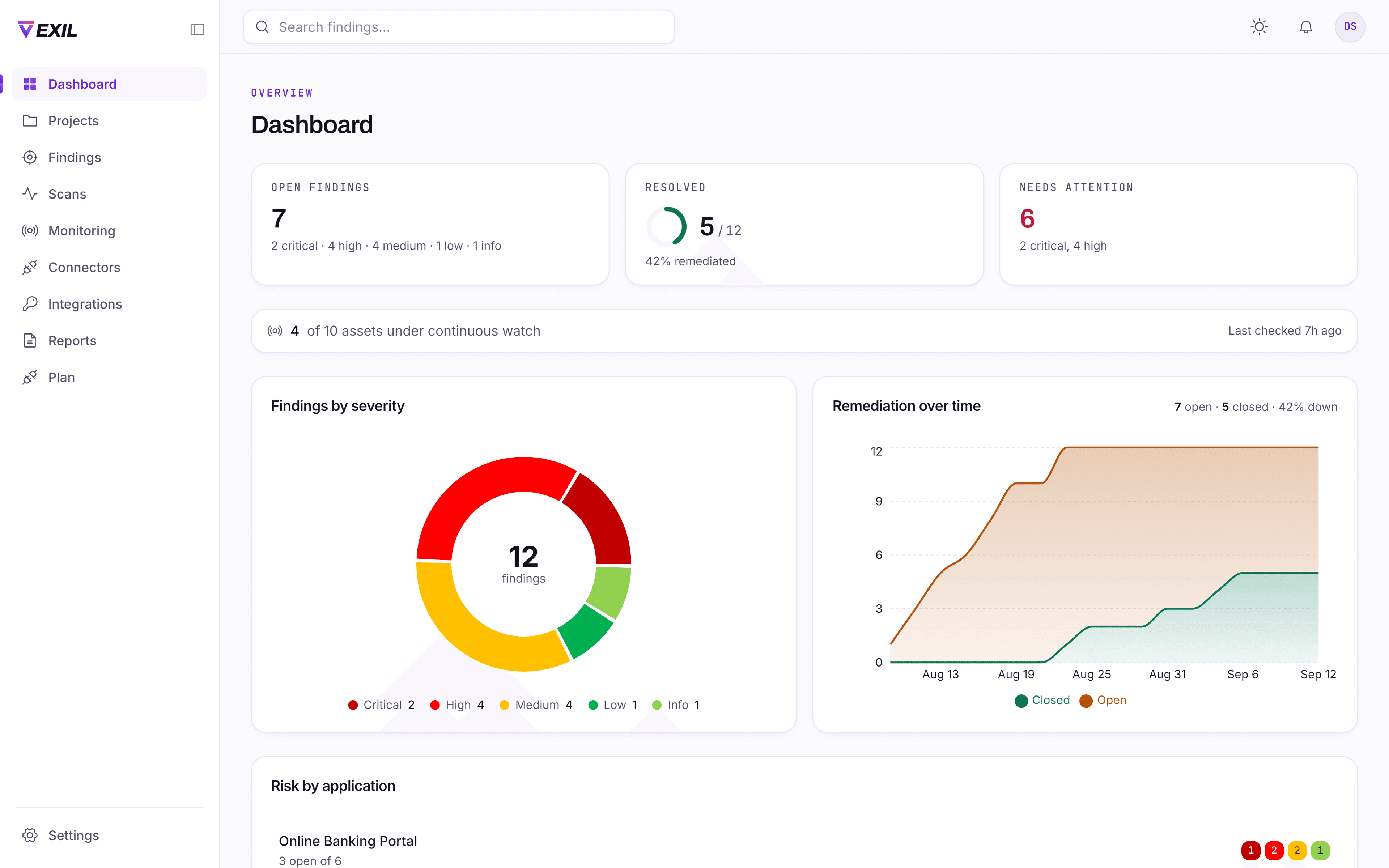
Request a retest on anything you have fixed - the verdict lands in the same workspace. Then export the report your auditor, customer or board is asking for.
Everything in the platform
Included with every engagement. There is no separate platform licence to buy.
The record of what was found, how it was proven, and what changed since.
Findings publish to your workspace during the engagement rather than at the end. Filter by severity, status, application, affected asset or project, with the counts of what each filter would leave.
CVSS v3.0 and v3.1 base scores are computed from the vector on the server, so the score and the vector can never disagree. The severity shown is derived from the vector, not typed in.
Each finding carries the raw HTTP request and response that demonstrate it, plus screenshots. Your engineer can reproduce the issue without asking anyone what was meant.
Every edit, status change, assignment and retest decision is recorded with the actor and time. The history survives the deletion of the finding it describes, which is the point of having one.
When a tester publishes a finding to you, the people who asked to hear about that severity are emailed. Choose critical only, critical and high, or nothing at all. One message per publish listing everything in it, not one per finding, because that is how a channel becomes a filter rule nobody reads.
Threaded discussion on each finding with @mentions and live notifications. Internal tester notes and client-visible notes are separate; only internal messages are marked, so an unmarked comment is one you can see.
From a confirmed finding to a verified fix, without leaving the platform.
Fixed, retest requested, retest passed and retest failed are distinct states with distinct meanings - who reported the fix, and whether a tester confirmed it.
Assign a finding to a developer. They are added to the project automatically, notified, and see the work assigned to them rather than the whole engagement.
Coverage tracked against OWASP WSTG v4.2, the OWASP API Security Top 10 and network infrastructure methodologies. Applying a methodology copies it, so editing the library never rewrites a test already in progress.
Test accounts are stored encrypted and shared with everyone on the project. Credentials recovered during testing are held separately and restricted to the testing team.
The deliverable, in the format the person asking for it needs.
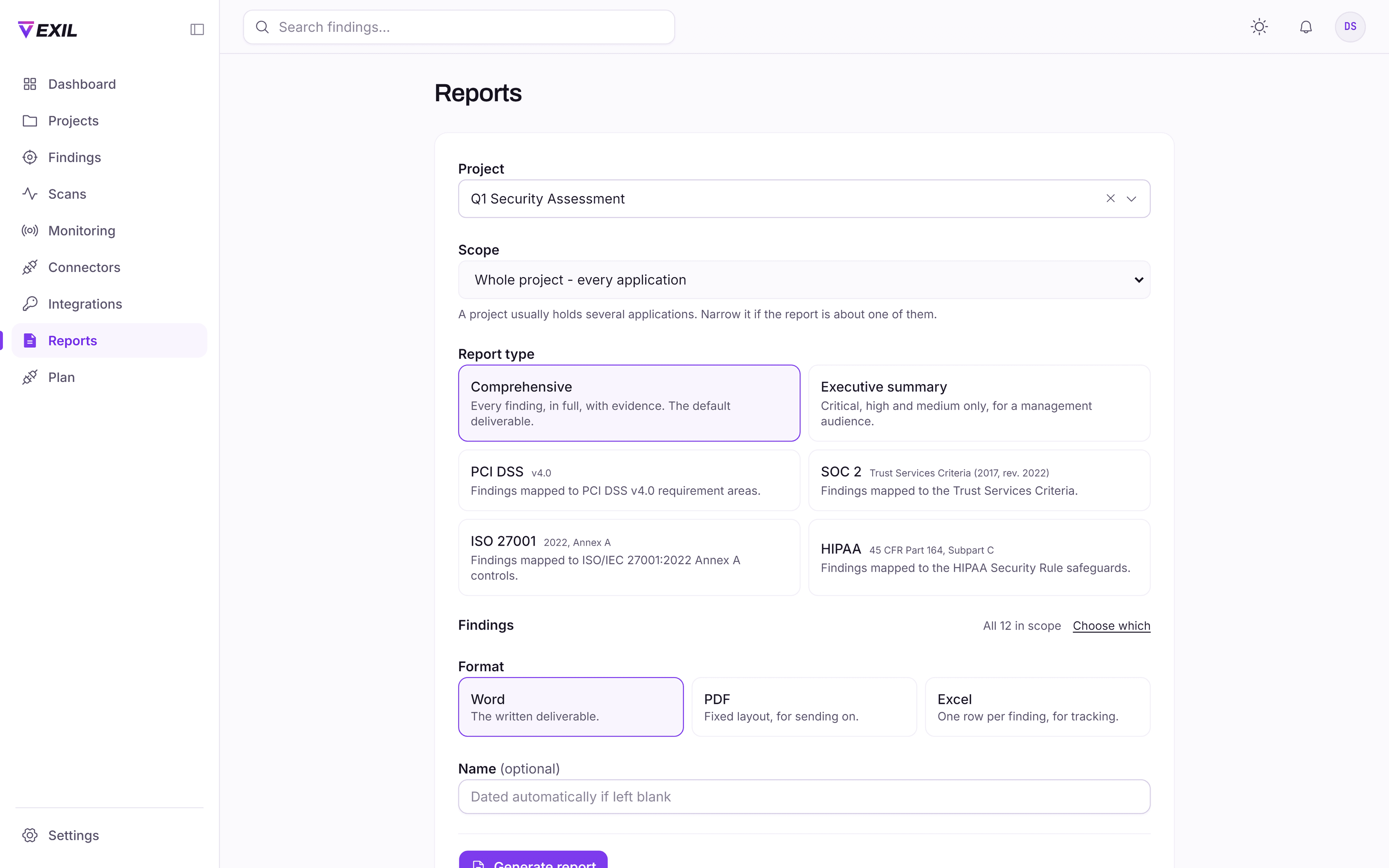
Comprehensive, executive, PCI DSS, SOC 2, ISO 27001 and HIPAA. The profile decides which findings are included, how the assessment is framed, and whether a control-mapping section is attached.
Findings are grouped under the framework’s own requirement areas. Every area is listed even when nothing was found against it, and anything the mapping cannot place is shown rather than dropped.
Word, PDF and Excel from the same data, so the three cannot say different things about one engagement. Upload your own Word template and every Word report for your organisation adopts it; the PDF and the spreadsheet keep the house layout.
Report on a whole project or a single application, over every finding or a selection you choose.
Who can see what, decided by you, enforced on the server.
Administrator, tester, client and developer baselines, extended by permission groups your administrator creates - so somebody can hold more than their role without becoming an administrator.
People see the projects they are a member of. A membership can be narrowed to a single application, so a contractor on the payments API cannot reach the rest of the engagement.
Your own administrators invite people, revoke invitations that have not been accepted, adjust access and deactivate leavers without opening a ticket with us.
TOTP enrolment with any standard authenticator app. Short-lived access tokens with rotating refresh, and a role or access change revokes outstanding sessions immediately.
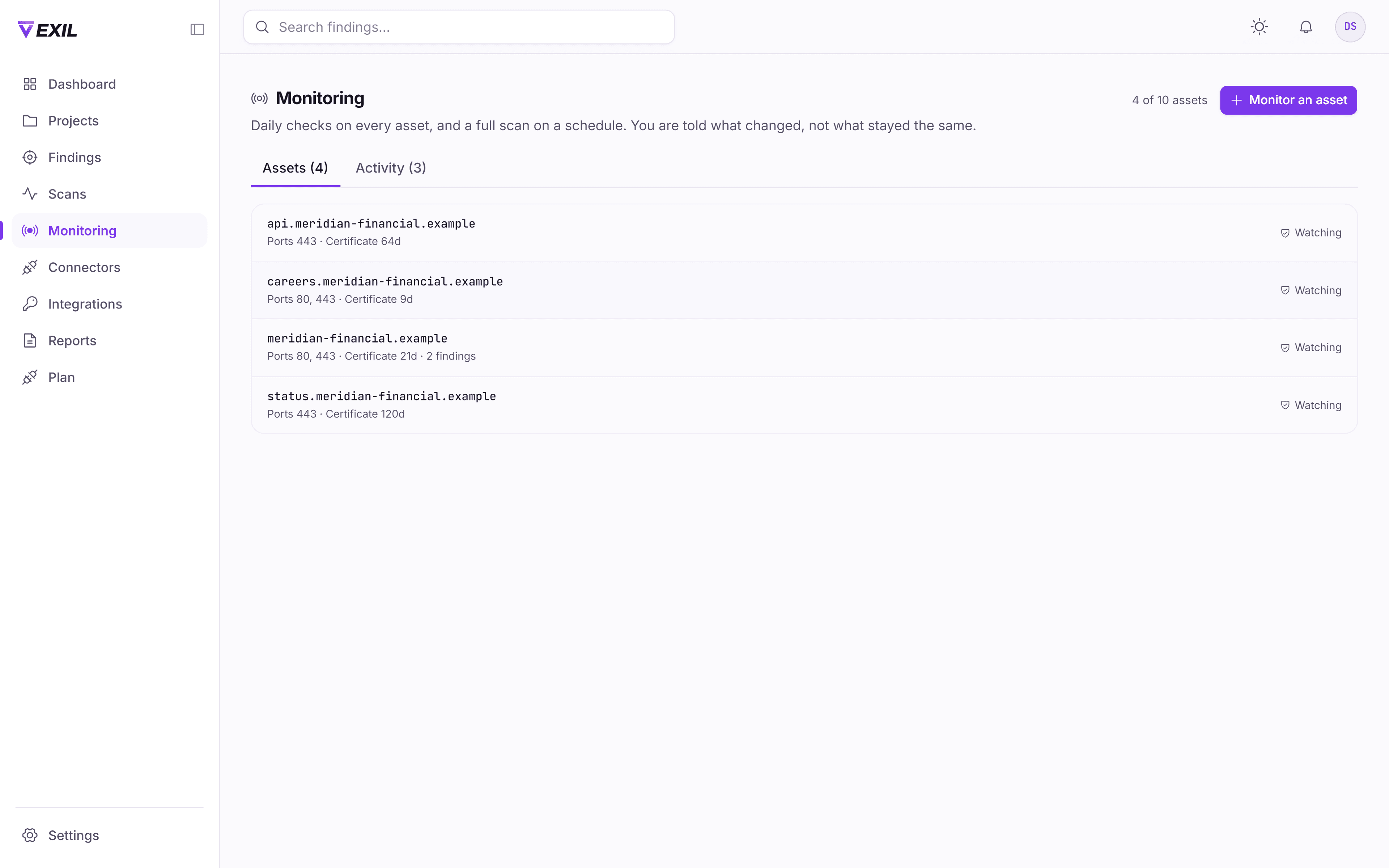
What changed on your estate between engagements: a check every day, a full scan every week or month, and new hosts found for you.
Every 24 hours we resolve the name, read the certificate and compare open ports against the last snapshot. It is cheap, and it is what catches the things that actually change between tests: a certificate weeks from expiry, a port that opened last Tuesday.
You choose the cadence per asset, or turn the full scan off and keep the daily checks. Deliberately not daily: the same deep scan against an unchanged target returns the same answer at real cost.
Weekly discovery looks for hosts you did not tell us about, using certificate transparency records and a probe per name. The estate that gets breached is usually the part nobody remembered owning.
New host, port opened or closed, certificate expiring, changed or invalid, DNS record changed, host stopped responding. Each event carries a severity and can be acknowledged, so the list stays what you have not dealt with.
A target is verified by a DNS record or a file you place, before anything is scheduled against it. Monitoring a standing register of assets is only safe if the register cannot contain somebody else’s estate.
Standing permission lasts a year, and the schedule stops when it lapses. You are warned before it does. A permission with no expiry silently authorises scanning for ever, months later, possibly after the contract ended.
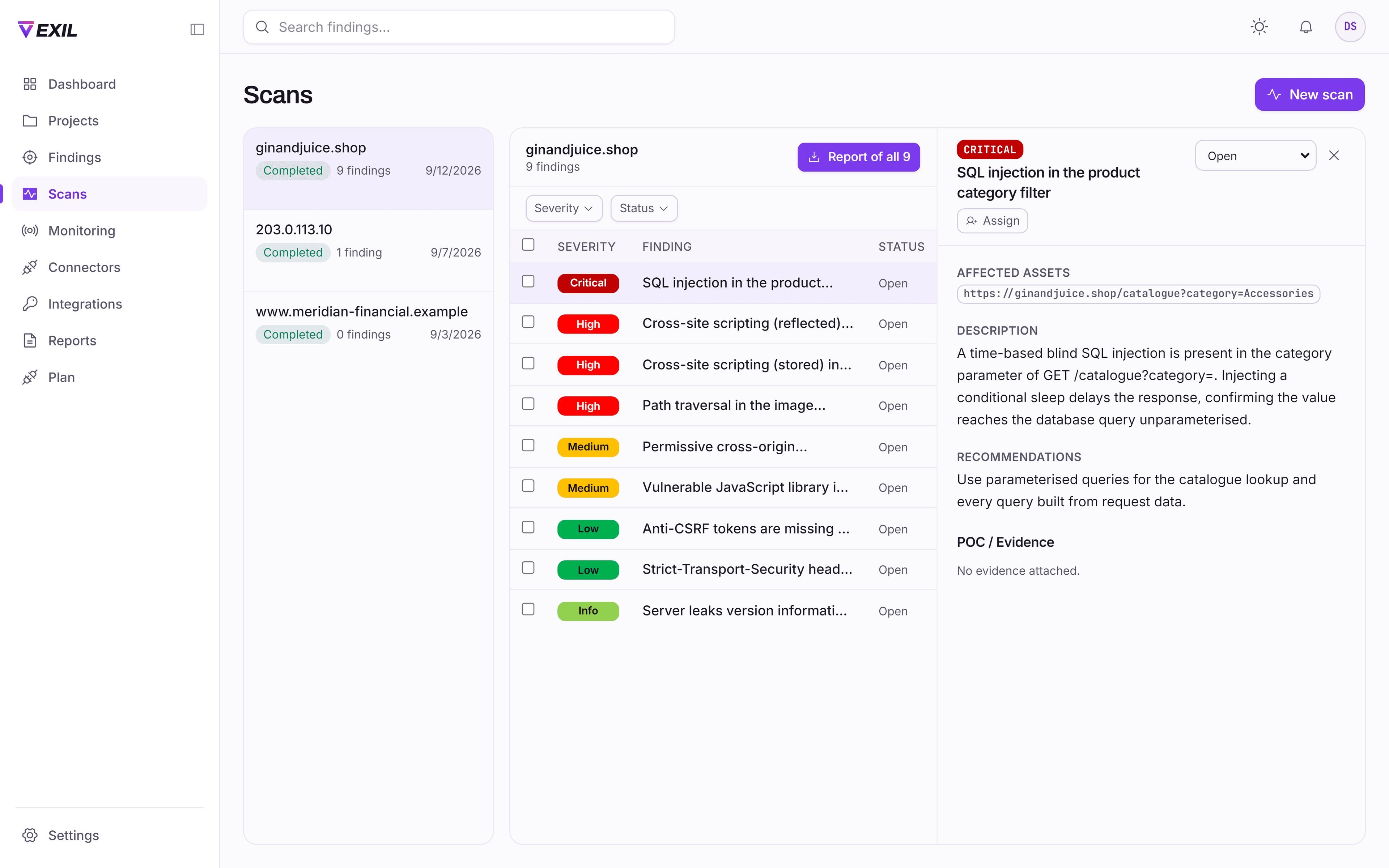
Between engagements, run your own checks against targets you own - a supplement to manual testing, never a substitute for it.
From a fast critical-and-high pass to a full crawl-and-analyse run. Each states how many checks were applied, so an empty result is distinguishable from a scan that did not run.
Each scan records who authorised it, when, from where, and the exact wording they agreed to. The wording is stored, not referenced, so it cannot be rewritten later.
Scan output lands in its own area rather than mixed into the findings your testers wrote. Promoting a result into the curated set is a deliberate act.
Targets are resolved and checked before a scan starts, so internal ranges and infrastructure you do not own are refused up front rather than scanned by accident.
Reporting
The board wants a page. Your engineers want the request that proves it. Your auditor wants it in their framework. Generate each from the same test, in Word, PDF or Excel.
For Your engineering team
Every finding at every severity, with full technical detail, evidence and remediation guidance.
For Leadership and the board
Risk posture and the findings that matter at that altitude, with informational and low-severity observations excluded.
For Your QSA
Findings mapped to PCI DSS requirement areas, with the software weakness classes the standard enumerates at 6.2.4.
For Your auditor
Findings mapped to the Trust Services Criteria, for the security evidence an examination asks for.
For Your certification body
Findings mapped to Annex A control areas, supporting the technical testing evidence the standard expects.
For Your compliance officer
Findings mapped to the Security Rule safeguards, for the evaluation requirement under §164.308.
What a penetration test is, and is not. A penetration test is evidence that may support an assessment. It is not a certification or an attestation, and no report produced here claims to be one. Your assessor decides what satisfies the standard.
FAQ
Neither, and it is worth being exact. Each monitored asset gets a lightweight check every 24 hours - DNS, certificate, open ports against the last snapshot - plus a full scan on a weekly or monthly cadence you choose, and host discovery weekly. A deep scan against an unchanged target every day returns the same answer at real cost, so we do not run one. If a provider tells you they scan continuously, ask what they run and how often.
Changes to your attack surface: a host we have not seen before, a port opening or closing, a certificate expiring, changing or failing validation, a DNS record changing, and a host that stops or starts responding. Each event has a severity and can be acknowledged, so the list is what you have not dealt with rather than everything that ever happened.
You prove control of the target first, with a DNS record or a file you place on it, before anything is scheduled. Standing permission then lasts a year and the schedule stops when it lapses, with warnings before it does. A standing register of scan targets is only safe if it cannot contain somebody else’s estate and cannot outlive the agreement.
Yes. A person’s membership can be narrowed to a single application within a project, so they see that application’s findings and nothing else in the engagement. You can also assign an individual finding to a developer, which gives them that work alone.
Only people you have added to the project, and only the projects they are members of. Access is enforced on the server for every request, not hidden in the interface. Your own administrators control who is invited, what they can reach, and when their access ends.
Your workspace and its findings remain available to you so that a report can be regenerated and a retest requested later. Data handling, retention and deletion are covered in the engagement agreement, and deletion on request is supported.
On the scoping call we walk through the platform with your application on screen, and you leave with a fixed price and a testing date.